Wednesday, January 21, 2026

Fender Mustang GTX Preset for Fleetwood Mac

This preset takes just a few clicks and twists to build from scratch on any Fender Mustang GTX amp. It delivers a consistent tone that works well at band volume, and it replicates a classic minimalist pedalboard: drive, delay, and reverb. 

This is the chain:

  • Stompbox: Mythic Drive (Klon) 
    • Gain 2:00 
    • Volume 2:00
  • Amp: ’65 Deluxe (no changes from defaults – always on)
  • Delay: Mono Delay
    • Level 12:00
    • Delay 300-330ms
    • Feedback 8:00
  • Reverb: ’65 Spring (no changes from defaults – always on)

These are the effects I use on different songs for our Fleetwood Mac set:

  • Everywhere: Delay
  • Little Lies: Delay
  • You Make Lovin’ Fun: Drive + Delay
  • Silver Springs: Delay
  • Go Your Own Way: Drive (+ Delay for the solo)
  • Tusk: Drive

I use “effects mode” on the GTX footswitch, so it becomes a 3 button pedalboard controller with switches 1-3 controlling drive, delay, and reverb – if the red LED is on, so is that effect. 

I use this with a Les Paul, bridge pickup at volume 3-4 for rhythm, switch to the neck pickup at 9-10 for solos. 

Here’s how to adjust the present if your guitar (like most* Fenders) has single-coil pickups instead of humbuckers:

  1. Make up for the lower output of the single coil pickups: 
    • turn up the gain and/or master volume on the ’65 Deluxe amp model (not the GTX’s actual volume control) until your guitar sounds like rock and roll – they interact with each other, so play around with both settings at the same time
  2. Tame the treble: 
    • turn the Mythic Drive’s Tone down so it’s not harsh
    • experiment to see whether adjusting ’65 Deluxe Amp Treble (down) and Bass (up, but not above noon) makes it sound better or not. 

If you want to hear how this sounds live, come to Tim’s Tavern at noon, this Saturday (January 24).

Monday, April 15, 2024

Electric travel guitar shootout: Traveler Ultralight vs Traveler EG-1 Matte vs Donner Hush-X vs Steinberger/Spirit GT-Pro

I can't find any direct comparison of the three electric travel guitars I am most interested in, and since they might be the three YOU are most interested in, too, I figure I'll take some notes as I go.

I've been using the Traveler ultra-light, including 3 weeks across spain and france by train and plane, for a couple years, but on my last trip I was frustrated enough with its limitations that I figuired I'd gotten my money's worth from it and was ready to upgrade.

The things I liked: 

  • light weight, easy to sling the bag over my shoulder or put it in the side straps of my soft-sided carryon bag
  • gig bag pocket has room for a Spark Go, cable, wired headphones (Grado SR-80), picks, tuner, and slide
  • little leg stand made it at least somewhat lap-playable
Things I didn't like:
  • tone: no volume, no tone knob - ok for turned down rhythm but brutal for lead - very harsh, wanted to roll off but couldn't 
  • access up the neck - although there's lots of frets, the body starts coming out from the neck above where it ends and that's harder to reach  
  • tuning stability - it was getting to where it wouldn't stay in tune for the length of an entire song 
  • only one bridge pickup - again, no options for tone. Just that one shrill tone. 

 I'm evaluating: 

  • Traveler EG-1 - mini Les Paul style. $499.
  • Donner Hush-X - similar to the Ultralight, but with a top brace as well as a bottom one. I put it in my Amazon cart at $349, and then later that day they had a flash deal for about $300.
  • Steinberger/Spirit GT-Pro - Gibson seems to own the brand now; this is a reboot of the Steinberger design. They did get Steinberger himself to make a promo video for the GT-Pro at least. 

I can't find any of these locally, so I'm going to take advantage of Amazon's return policy - including local drop-offs so I don't pay anything for return shipping - to test out all three and decide which one I'll take on my upcoming travels, including a cross-country road-trip.

Right now my expectations are: 

The Traveler: will be pretty solid, it's a front-runner; it's basically what I'm used to, minimally larger, with better pickup, volume and tone knob. Sounds like a conservative winner. But it is also the most expensive. 

The Donner. As their 2nd gen product it sounds like they had some good design feedback and improvement over the Hush-I - it may be as much on target as the EG-1. I'm not sure if it'll be as compact as the EG1, especially in its bag. I do like the separate pickups, good chance of tonal range, especially vs the EG-1 single humbucker 

The GT-Pro is a wide open Q. I've seen some youtube reports of awful QC, not sure if the one I get is MI China or Indonesia, guess we'll find out. Also unsure if the pickups are any good, will the tremelo be decent? it's not the legenendray harm-trem of the OG steinbergers. But, it's actrually designed as a full-fledged guitar that just happens to be stripped down to what is optimal for travel -0 not a purpose-built travel guitar. So, perhaps it's a whole nother level of travel guitar "real tone" and "real feel" 

I expewct all of these have fairly entry level pickups, I'm just hoping not actively BAD pickups. But I do have a SD JB bridge pickup that I got to put into a 3/4 scale cheap guitar, just to practice soldering before risking upgrading the pickups on my telecaster; I figure there's a good chancve I'll end up swappoing the JB into whatever I get - I saw several reviewers say they did similar upgrades, including even that exact bridge P/U, on these guitars and good results.

First one should arrive tomorrow, we'll see!

Saturday, January 24, 2015

Doofusdan.com is mine at last

Feels like I've been waiting for it to became available for 20 years - somebody had been squatting on it for ages and as far as I know, never used it. At last, they let the registration lapse and now it's mine! Bwah-ha-ha....

I just noticed I haven't posted anything here in over a year - though I did post a few things over on MassivelyUseful

Mostly it's because I've been quite busy, and having a great time, at my new gig at Tableau. We're hiring, so if you're awesome, check us out and get in touch!


Tuesday, June 25, 2013

Papa's Tech Class: Help your kids deconstruct a computer

My 8-year-old son I. loves taking things apart. He loves to see what's under the covers - and he also loves the destruction!

He's long had his eyes on the three old desktop computers lurking in our basement. Taking them apart was the first thing he mentioned when we started talking about what we'd do for Papa's Tech Class.

To give you an idea of the vintage, I built the newest PC to run betas of what turned out to be Windows Vista; there's also a G4 PowerMac one of my friends acquired when his employer was getting rid of obsolete computers, and an even older PC that once ran software like AudioGalaxy (in its awesome first incarnation).

If you have an obsolete PC lying around, taking it apart can be a fun activity with your kids. Unlike building a new PC, there's no worry if they damage anything.

Unlike most laptop computers, desktops can be disassembled with tools you probably already have around the house. You can get it pretty far apart with just a Philips head screwdriver (#2 and #1 sizes - the most common). If you've also got a small pair of pliers, that can help young fingers get a good grip to pull out on those really jammed-in cables.
All you really need to disassemble most desktop computers is a screwdriver with standard bits. A small pair of pliers is the next most useful tool.
For protection, check the metal edges of the case. Some PC's have pretty raw edges that can cut fingers — especially little, uncalloused fingers.

You can do this easily on a living room or kitchen table, but put down some newspaper or cardboard to protect the work surface and make it easier to rotate the computer.

Depending on your kid, you may have fun identifying the major components of computers (CPU, RAM, motherboard, input and output ports, hard drive, CD/DVD drive, graphics card & CPU). You can also trace the paths data flows through in terms of things the kids will be used to. For example, when you surf the web, the web page comes in over the network connection; when you put in a game disc, the software on the disk is read from the DVD drive and goes over these cables to RAM, and the CPU reads the instructions from RAM and follows them, then it tells the GPU what to draw on the screen, and the GPU sends a video signal out to the display, and plays sounds through the speakers...

Finally, if the thought of rendering a functional piece of hardware non-functional rankles you, you can always donate them - there are many eCycling options around Seattle. Another approach to consider for making use of PC's that can't handle current operating system versions is installing Linux. But here at PTC, we have a Raspberry Pi for our Linux hacking, which uses a fraction of the power - and we also have several unused laptops of more recent vintage.

Tuesday, June 18, 2013

"Papa Tech Class" - summer hacking with my kids

After completing graduate school, I'm taking the summer off with my boys, ages 8 (I) & 11 (Z). One of the things they asked to do this summer is "Papa Tech Class."

Today, on the first day of summer with just the three of us at home, Z asked to get a blog set up so he could write about one of his passions: soccer.

Z had previously asked about making web pages, and he learned how to do basic HTML by hand. He learned inserting images, creating links, and basic page structure. He could see the results by opening the HTML file locally in a web browser. We uploaded the file to a web server and he could see the page on the Internet. I think it's useful to at least see what's going on one layer down - though HTML and FTP are still pretty far above bare wire & bare metal!

To make the blog an ongoing concern, we signed up for a free blog hosted on WordPress.com. WordPress provides great blogging features like ready-made templates, WYSIWYG editing, and it's a very popular platform for blogs of all sizes. So it's got a great deal of room to grow, if Zeb wants to get fancier later on. So using WordPress lets Z focus on what he really wants to do: write about soccer.

I knew we wanted to have prior review & approval of anything Z wants to post, at least while he's getting started and learning the ropes. To set that up, I created one account for the parents to use, and created the blog during the sign-up process. So the parents' account owns the blog.

Next, I logged out of WordPress.com, and then created a second WordPress.com account for Z to use. During the sign-up process, you have the option to sign up for just a username without creating a blog, and that's what I did.

Finally, I logged back into the parental account, and added Z's account as a contributor to the blog. This way he can write articles any time he likes, but he can't publish them on his own. When he is done, instead of having a "publish" button, he has a "submit for review" button. This will send an email to the parents. We can then review the post and approve it, edit it ourselves, or discuss with Z what needs to be changed and why.

This isn't perfect; to make changes to the blog itself, like changing the theme or adding widgets, I'll need to log him in under the parents' account - but since I don't use that account for any other blogs, there's no worries there.

You can follow Z's blog at http://zebsoccer.wordpress.com.

Monday, February 18, 2013

Getting Raspberry Pi DHCP working with internet sharing from OS X

My sons asked to learn more about computers, so we got a Raspberry Pi. We also got Adafruit's Pi Cobbler kit. Using Adafruit's Occidentalis distro of Raspbian, I had to do a little configuration to make the following setup work, and it turned into a little bit of a networking lesson for my kids, too. I figured I'd write it up in case some other Googling Pi user needs to learn & solve this particular combination of problems - or in case I forget and need to re-do this sometime. :-)

The goal was to have the Pi share a wifi-equipped Mac's network connection.

Mac running Lion (OS X 10.7) is connected to Internet via wifi.

Pi connected via Ethernet cable to Mac.

Share the Mac's Internet connection: on the Mac, go to System Preferences - Sharing.
  • Check the box Internet Sharing from the list of services. 
  • Confirm that that the sharing status is On. 
  • Confirm that Ethernet is checked on the list of ports to share to.
Now power on the Pi. It should get an IP address assigned via DHCP, and it should be on the network. Thanks to Occidentalis, the Pi is registered with Rendezvous using the name raspberrypi.local. If  DHCP and Rendezvous are both working, you can reach the Pi from the Mac using that name. This is great, because you can plug in and access a headless Pi quite easily this way.


Macintosh:~ dan$ ping raspberrypi.local
PING raspberrypi.local (192.168.2.2): 56 data bytes
64 bytes from 192.168.2.2: icmp_seq=0 ttl=64 time=0.720 ms
64 bytes from 192.168.2.2: icmp_seq=1 ttl=64 time=0.982 ms
64 bytes from 192.168.2.2: icmp_seq=2 ttl=64 time=0.919 ms
^C
--- raspberrypi.local ping statistics ---
3 packets transmitted, 3 packets received, 0.0% packet loss
round-trip min/avg/max/stddev = 0.720/0.874/0.982/0.112 ms


But, it wasn't working for us. The Pi wasn't registering its name, we couldn't reach it from the Mac. Pings just resulted in "ping: cannot resolve raspberrypi.local: Unknown host". We tried all the suggestions on the FAQ and troubleshooting wiki (cable swapping, reflashing the Pi's software, swapping power supplies) but they did not help.

There were two problems: the Pi's network configuration needed to be changed, and the Mac's Internet Sharing needed to be restarted.

Fixing the network configuration on the Pi, David Singleton's web page gave me a clue about needing to enable the Ethernet interface on the Pi to make it get configuration from DHCP.

This is the original network interface configuration on Occidentalis:

pi@raspberrypi:~$ cat /etc/network/interfaces
auto lo

iface lo inet loopback
iface eth0 inet dhcp

auto wlan0
allow-hotplug wlan0
iface wlan0 inet dhcp
        wpa-ssid "my-network-ssid"
        wpa-psk "my-wifi-password"

Using nano, and opening the file as superuser because it is a restricted system file,

pi@raspberrypi:~$ sudo nano /etc/network/interfaces

we make the following additions (in bold):

auto lo

iface lo inet loopback
auto eth0
iface eth0 inet dhcp

#auto wlan0 allow-hotplug wlan0 iface wlan0 inet dhcp
#        wpa-ssid "my-network-ssid"
#        wpa-psk "my-wifi-password"

Here, eth0 is the Ethernet interface,  lo is the loopback interface, and wlan0 is the wireless interface.

We don't have a wireless adapter on our Pi, so we commented out the three lines of wireless interface configuration.

Then, we restart the network, forcing it to load the new interfaces file.


pi@raspberrypi:~$ sudo /etc/init.d/networking restart


That worked better. The Pi was now coming up and making a DHCP request. But it wasn't getting a response. That's not a Pi problem, that's a problem with the Mac's Internet Connection Sharing.

Off to Google again - this thread showed other people had problems with ICS in Lion. The easiest suggestion was to simply stop and restart the service, and this worked. One more restart of the Pi's networking, and as David says: "yay, network!"

Monday, April 09, 2012

Coping with metadata problems in book searches

I'll soon be facing the same issue and using the same workaround that findings.com did:

Whenever we can, we will supply WorldCat with an ISBN or other identifier to bring you straight to a book…but sometimes you will see a number of search results based on an author and Title. We would like this to be as seamless as possible, but the world of book publishing metadata is riddled with information gaps and geographic thorns.


ebooks need skimability

Stephen Johnson, talking to Findability:

If you could move one feature of paper books to digital books, what would that be?

Skimming. It’s a funny thing with print vs. ebooks; the digital age is supposed to be all about attention deficit disorder and hypertextual distractions, but ebooks lock you into reading them in a linear fashion more than print books do. It’s much easier to pick up a print book and flip through the pages, get a sense of the argument or structure, than it is with an ebook (or magazine.) It’s a very interesting interface challenge: I think it’s probably solvable, and I know many smart folks are working on it, but we don’t have a true solution yet.


I agree. It's one reason browsing in bookstores is still better than shopping online, even with Amazon's "look inside this book" - since flipping through the pages hasn't yet been implemented.

It's just a matter of time, though - I'd guess next year or two. Might just need the next generation of mobile CPUs & GPUs to ship. Flipping pages in a book requires some serious framerates!

Saturday, April 07, 2012

The New Aesthetic

Bruce Sterling:
The evidence is impossible to refute. Anybody with a spark of perception who looks through this thing:
http://new-aesthetic.tumblr.com/
must recognize that modern reality is on display there. What we think about that, or do about that, is another matter. That it exists is not in question.

Also, be sure to read James Bridle and also this:
People are “acting” in ways we may or may not understand, which may or may not have an effect in the real world, whether it’s signing petitions, organising riots (on BBM), clicking, ‘liking’ KONY, whatever, the correct (maybe) response is not to have an opinion (default internet response, still) or a moral position, but to live inside the thing as it unfolds.

And there's even more!

We Are Creators, Not Consumers

My class reading this quarter is Mobile Design and Development, which you can read free online.

Author Brian Fling says:

We Are Creators, Not Consumers

The final principle of Mobile 2.0 is recognizing that we are in a new age of consumerism. Yesterday’s consumer does not look anything like today’s consumer. The people of today’s market don’t view themselves as consumers, but rather as creators.


He's talking about "user-generated content" as creation. But to me, "create" doesn't feel like the right verb for what makes social constructs happen.

Still, my reaction - being bothered by that equation and needing to probe at it like a sore tooth - tells me I should take a closer look at what is happening there.

Ok, brain, whatever you say.

(That's right, Pinky.)


Saturday, March 17, 2012

IT buzzwords and memes of the moment: cloud & consumerizarion

Peter Kretzman, IT Consumerization, the Cloud and the Alleged Death of the CIO:
Let me be clear once again: this frequent linking of cloud and IT consumerization to the looming demise of the CIO and IT is not just misguided, but actually gets it completely backwards. In fact, I argue that IT consumerization and the cloud will actually elevate the importance of IT within a company, as both a service and a strategic focus.

Let’s list and then discuss some of the ways that combining these memes (IT consumerization, cloud, and the ensuing heralded death of the CIO) falls down when measured against common sense and reality:

It fails to understand the full range of what a CIO (or IT) actually provides for modern-day companies.
It fails to recognize the profound pitfalls of a decentralized and fragmented approach for company systems and technologies.
It erroneously equates IT consumerization with the BYOD trend, missing the larger important picture that underscores the strategic need for IT.
It misunderstands the interplay of commoditization and competitive strategic advantage.

Writing in "Wired Cloudline sponsored by IBM."


IT is hard enough already - why do things you don't need to?

Galen Gruman in Infoworld:

I don't get why IT itself takes on so many management challenges unrelated to technology operations or strategy.


Yes, it's not a good use of limited resources. But I don't think the problem of taking on things that don't need to be done is unique to IT.

Looking at IT for an answer to this is misplaced; instead, I'd start by looking at psychology, both organizational and individual.

Close Encounters of the Collaborative Kind

Good article in this month's IEEE Computer magazine, Close Encounters of the Collaborative Kind:
The participants in a collaborative interdisciplinary project found that developing a shared, project-specific communication style helped them overcome cultural barriers, understand the nuances of each other's work, and enhance the accuracy, interpretability, and utility of their models.


Wednesday, February 29, 2012

Taming Complexity and Tesler's Law

I always have a good think when I read Don Norman. Just started reading his Living with Complexity and it's holding true to form. It's worth reading the whole book just to be reminded of Tesler's Law.
Complexity can be tamed, but it requires considerable effort to do it well. Decreasing the number of buttons and displays is not the solution. The solution is to understand the total system, to design it in a way that allows all the pieces fit nicely together, so that initial learning as well as usage are both optimal. Years ago, Larry Tesler, then a vice president of Apple, argued that the total complexity of a system is a constant: as you make the person's interaction simpler, the hidden complexity behind the scenes increases. Make one part of the system simpler, said Tesler, and the rest of the system gets more complex. This principle is known today as Tesler's law of the conservation of complexity. Tesler described it as a tradeoff: making things easier for the user means making it more difficult for the designer or engineer. “Every application has an inherent amount of irreducible complexity. The only question is who wil have to deal with it, the user or the developer.” (Tesler and Saffer, 2007) With technology, simplifications at the level of usage invariably result in added complexity of the underlying mechanism.
If you are a Don Norman newbie, start with The Design of Everyday Things, that's a classic. I liked the first edition's title better, Psychology of Everyday Things. He called it POET for short.

I also just read an article Don wrote for core77: Act First, Do the Research Later, where he demonstrates that pragmatism matters, and there are many paths to good design.
Today we teach the importance of doing design research first, then going through a period of ideation, prototyping and iterative refinement. Lots of us like this method. I do. I teach it. But this makes no sense when practical reality dictates that we do otherwise. If there is never enough time to start with research, then why do we preach such an impractical method? We need to adjust our methods to reality, not to some highfalutin, elegant theory that only applies in the perfect world of academic dreams. We should develop alternative strategies for design.
Why it is not necessary to start with design research: Here are five very different arguments to support the practical reality of starting by designing, not through design research. First, the existence of good design that was not preceded by research. Second, the argument that experienced designers already have acquired the knowledge that would come from research. Third, the research effort of a company ought to be continually ongoing, so that results are available instantly. Fourth, and most controversial, research might inhibit creativity. And fifth, when the product is launched and the team assembled, it is already too late. 
That's particularly fun given that I'm taking a course right now which is all about design research. I do enjoy holding two opposed ideas in my head at the same time. (No one should think F. Scott Fitzgerald was literally setting this as a true, singular test of a first-rate intellect; it's a necessary quality, but not sufficient on its own.)

Hey! I just found the whole quote, and there's two more sentences to it that I've not seen before.
Before I go on with this short history, let me make a general observation – the test of a first-rate intelligence is the ability to hold two opposed ideas in the mind at the same time, and still retain the ability to function. One should, for example, be able to see that things are hopeless and yet be determined to make them otherwise. This philosophy fitted on to my early adult life, when I saw the improbable, the implausible, often the "impossible," come true.
Seeing that things are hopeless and yet being determined to make them otherwise. Yup. That's worth doing.

If you want to investigate more about reconciling opposing ideas, I suggest The Opposable Mind.

Sunday, February 26, 2012

Jamming for Joy with Jaco


Watching this is bringing me joy.

Jaco Pastorius is one of my favorite musicians; but I never saw him play live before his untimely death in '87. In fact, I've never even seen video of him playing. Until tonight.

I'm watching him play Montreaux '82 with Randy Brecker. Streaming on Netflix, natch.

You might know Jaco as the bass player on several of Joni Mitchell's albums, like Hejira (the one with Coyote on it).

He also played on several of Pat Metheny's best albums like his debut, Bright Size Life, which some say is one of the 100 Greatest Jazz albums of all time.

Jaco was a member of Weather Report with Wayne Shorter and Joe Zawinul - listen to Birdland on Heavy Weather.


Finally check out his masterpiece, Word of Mouth, with an all-star big band of fusion jazz greats, from Herbie Hancock to Toots Thielman and Jack DeJohnette. I rank it with Sergeant Pepper and Uh-huh as one of my personal favorite albums.


Sunday, February 19, 2012

Business metrics as solution requirements

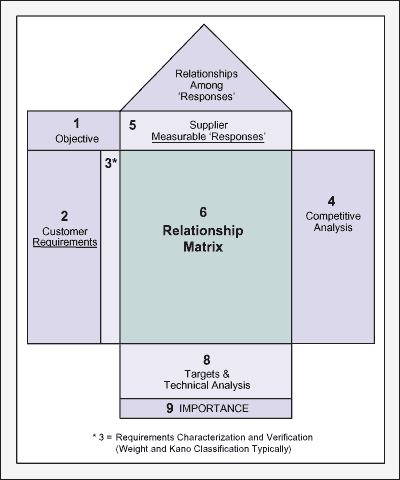
In my day job, my team has started using a few old-school tools in our infrastructure architecture practice. One of these is Quality Function Deployment (aka QFD, aka House of Quality) which has its roots in Six Sigma manufacturing quality practices.
QFD House of Quality graphic from iSixSigma.com
While looking for a bit of information, I stumbled across an article titled “Retiring the House of Quality.” Since we're just beginning to use QFD, I wanted to see what the problem was. Turns out the article wasn't critiquing QFD itself, but the (mis)use of QFD in “innovation processes.”

The article ties into many of the themes we’re investigating in my current graduate school class on Evidence-Based Design (aka Human-Centered Design or User-Centered Design).

I liked the distinction made between concept innovation and technical innovation; I found that quite useful.
Distinguishing initial concept innovation from downstream technical innovation - from Retiring the House of Quality
But more importantly, I really appreciated the reframing around requirements where there were existing business processes with defined success metrics.

Consider the traditional approach of assuming that the technical solution team can identify certain technical requirements for the solution, and assuming that what is built meets those solution requirements are met, then the solution will address the business problem.

Instead of that approach, the authors suggest having the existing business process success metrics directly become the solution requirements.

The outcome-driven innovation methodology uses customer-defined metrics (desired outcome statements) to guide the formulation, evaluation, and selection of new product and service concepts. The resulting concepts are tied directly to the customer’s desired outcomes—and the job the customer is trying to get done—increasing the likelihood that the customer will value the new concepts’ features. Because the inputs used to guide concept innovation are tied directly to the customer’s actual inputs, no translation is required.

Taking the business process requirements as the solution requirements rather than having to invent intermediate solution requirements is a great insight.

Literally, this is disintermediation, but instead of disintermediating two parties by removing a middleman, it disintermediates a set of, well, intermediate requirements.

And because its exactly in that translation process of generating the intermediate requirements where technical solutions go wrong so often, it looks very promising for improving overall business satisfaction with solutions.

If you teach people, they have this miraculous capability...

I greatly enjoyed reading Architecture for Humanity's book Design Like You Give A Damn. It is full of wonderful, creative responses to hairy problems, often with incredible design constraints and stakes of life and death. 

One of my favorite lines was this quote from Maurice Cox:
I have come to believe that if you teach people what their options are, they have this miraculous capability to make the decision that is in their best interest. It was amazing to watch this unfold. 
I liked DLYGAD so much, I added it to my list of (physical) architecture books for IT architects. 

A second volume of DLYGAD is coming out soon. I can't wait to read it.

Thursday, October 13, 2011

Technical Debt

I saw a great Steve McConnell (author of the crucial book Code Complete) webcast on Technical Debt and wanted to get these links published: blog post, webcast replay. The webcast replay has a link to a slide deck you can download - just register for the webcast. Highly recommended. Here's Steve's opening blurb:
The term technical debt was coined by Ward Cunningham to describe the obligation that a software organization incurs when it chooses a design or construction approach that's expedient in the short term but that increases complexity and is more costly in the long term. Ward didn't develop the metaphor in very much depth. The few other people who have discussed technical debt seem to use the metaphor mainly to communicate the concept to technical staff. I agree that it's a useful metaphor for communicating with technical staff, but I'm more interested in the metaphor's incredibly rich ability to explain a critical technical concept to non-technical project stakeholders.


Update Feb 20 2012: the webcast replay links above no longer work, but Construx has posted the webcast on YouTube. 

And they posted the slides on SlideShare:
Managing Technical Debt
Last but not least, Construx has the same content in whitepaper form.

Saturday, October 08, 2011

#OccupySesameStreet

99% of da wurldz cookeez r eatn by 1% of da wurldz monsterz. OM NOM NOM NOM.

Learn to be a better troubleshooter


The very best technical talents often have massive troubleshooting chops. But troubleshooting isn't inherently a technical skill; it's a set of tools to achieve clear thinking and knowledge. 


This is science!


For your consideration:  the clearest expositions of technical troubleshooting strategies and tactics since Sun Tzu did it for war.


In no particular order, here are links and a few choice excerpts.


ESR, the ninja-slicing, recursive-software-naming, Free Software advocate who is a key figure in the culture of open-source, wrote one of the foundational documents of hackerdom. As of this writing, it's at version 3.7, last updated December 2010. The beauty of it is, in telling you how to ask questions the smart way, it also teaches you troubleshooting.  


How To Ask Questions The Smart Way
Eric Steven Raymond
  • Be precise and informative about your problem
  • Describe the symptoms of your problem or bug carefully and clearly.
  • Describe the environment in which it occurs (machine, OS, application, whatever). Provide your vendor's distribution and release level (e.g.: â€œFedora Core 7”, â€œSlackware 9.1”, etc.).
  • Describe the research you did to try and understand the problem before you asked the question.
  • Describe the diagnostic steps you took to try and pin down the problem yourself before you asked the question.
  • Describe any possibly relevant recent changes in your computer or software configuration.
  • If at all possible, provide a way to reproduce the problem in a controlled environment.
Do the best you can to anticipate the questions a hacker will ask, and answer them in advance in your request for help. 
Giving hackers the ability to reproduce the problem in a controlled environment is especially important if you are reporting something you think is a bug in code. When you do this, your odds of getting a useful answer and the speed with which you are likely to get that answer both improve tremendously.


ESR also says: 


Simon Tatham has written an excellent essay entitled How to Report Bugs Effectively. I strongly recommend that you read it.

I agree! Check it out:

  • The first aim of a bug report is to let the programmer see the failure with their own eyes. If you can't be with them to make it fail in front of them, give them detailed instructions so that they can make it fail for themselves.
  • In case the first aim doesn't succeed, and the programmer can't see it failing themselves, the second aim of a bug report is to describe what went wrong. Describe everything in detail. State what you saw, and also state what you expected to see. Write down the error messages, especially if they have numbers in.
  • When your computer does something unexpected, freeze. Do nothing until you're calm, and don't do anything that you think might be dangerous.
  • By all means try to diagnose the fault yourself if you think you can, but if you do, you should still report the symptoms as well.
  • Be ready to provide extra information if the programmer needs it. If they didn't need it, they wouldn't be asking for it. They aren't being deliberately awkward. Have version numbers at your fingertips, because they will probably be needed.
  • Write clearly. Say what you mean, and make sure it can't be misinterpreted.
  • Above all, be precise. Programmers like precision.

But the first place I send people when I want them to understand what I'd like to get as a good bug report is Joel Spolsky's story of Jane, the very, very good software tester. 

It's pretty easy to remember the rule for a good bug report. Every good bug report needs exactly three things.
  1. Steps to reproduce,
  2. What you expected to see, and
  3. What you saw instead.
Seems easy, right? Maybe not. As a programmer, people regularly assign me bugs where they left out one piece or another.
If you don't tell me how to repro the bug, I probably will have no idea what you are talking about. "The program crashed and left a smelly turd-like object on the desk." That's nice, honey. I can't do anything about it unless you tell me what you were doing.

If you don't specify what you expected to see, I may not understand why this is a bug. The splash screen has blood on it. So what? I cut my fingers when I was coding it. What did you expect? Ah, you say that the spec required no blood! Now I understand why you consider this a bug.
Part three. What you saw instead. If you don't tell me this, I don't know what the bug is. That one is kind of obvious.

Check out this book: Are Your Lights On: How to find out what the problem really is, by Gause and Weinberg. They wrote the book on requirements, too. 


Here's some random guy's 2 minute video review of it: 


KB555375 might be Microsoft's best KB article of all time - but by all means, if you know a better one, say so in the comments.


Microsoft Support Knowledgebase Article ID: 555375 - Last Review: July 22, 2005 - Revision: 1.0
How to ask a question 
Author: Daniel Petri MVP
Good examples of questions will include information from most of the following categories: - What are you trying to do?- Why are you trying to do it?- What did you try already, why, and what was the result of your actions?- What was the exact error message that you received?- How long have you been experiencing this problem?- Have you searched the relevant forum/newsgroup archives?- Have you searched for any tools or KB articles or any other resources?- Have you recently installed or uninstalled any software or hardware?- What changes were made to the system between the time everything last worked and when you noticed the problem? Don't let us assume, tell us right at the beginning.
In fact, if you know of ANY other top-notch sources of troubleshooting wisdom, put a link in the comments!


There's one I'm trying to find that I had as a mousepad - it was about 10 troubleshooting tips - one of them was something like "Problems don't just go away on their own. If you haven't fixed the problem, the problem isn't fixed." Anybody know what that's from?


(I'll try to fix the formatting on this post later, ok?)