There are 4062 engines that are this big (spreads hands wide) and there are big glass tubes where you go to sleep until the journey's over and you also get freezed. And you're going to go into hypersleep until the journey's over. And since it's so powerful it can explore other universes and it looks like a yellow base and a red middle and a nasa sign and a Z on the other side and a yellow top. And there's a a cannon in case the aliens are mean and its also magnetic [the cannon] and it can sort of clip onto the gravity. [q: what do you do when you clip onto gravity?] then it pulls you through onto land and the astronauts can explore the planet. This rocket's so fast it can get to a different solar system. It can shoot past Pluto in just sixty minutes and one second.Ok.
And now say "By the person Zeb aged 4 almost 4 and a half"
And now I'm ready for you to put my idea on the Internet and send a copy to NASA.
Ok?
Sunday, April 30, 2006
Zeb's Z-Rocket idea for exploring the universe
Guest blog entry on rocket design for space exploration, as dictated by Zeb:


Bringing "Web 2.0" Concepts to the "Enterprise"
Good stuff here. Why is it easier for me to blog personally to the whole internet than to have a blog about my job to share with the people I work with?
Jeremy Smith's blog: What I Read Over the Weekend: Bringing "Web 2.0" Concepts to the "Enterprise"
Well, the Internet was a-buzzin' with articles, comments, and opinions on bringing 'Web 2.0' concepts 'inside the firewall' i.e. using them in the 'Enterprise' with emphasis on how it all relates to Knowledge Management Tools/Systems.
Saturday, April 29, 2006
HandBrake and ffmpegX are essential Mac OS X DVD & video file tools
HandBrake is all you need to take a movie on DVD and rip it to your OS X Mac, just like you use iTunes to rip a music CD.
I repeat, HandBrake is all you need to take a movie that's on DVD and rip it to your OS X Mac, just like you use iTunes to rip a music CD.
If and only if you need to convert some other random video format (Xvid or some random .avi files for instance) to something your Mac can play, then ffmpegX is what you need. Rather geeky interface but if you just select from the presets menu, things will be easy as 1-2-3.
The ffmpegX installation is a 3-parter, you have to download - from provided URLs - some zip files (open-source conversion source libraries) and then point the installer to the files you downloaded. Just read the install screen and you'll be fine.
You can also trivially use these applications to get your video, whether downloaded or ripped from DVD, into a format suitable for use with a Sony PSP (my portable entertainment center of choice at the moment) or a video-capable iPod, or the like. The documentation/howto links on their respective sites do a good job explaining what to do. And it is easy, really.
Documentation links:
The quickest handbrake walkthrough you could want.
Other HandBrake documentation for more specific topics.
Extensive collection of ffmpegX howtos - anything you want to do with ffmpegX, there's a howto document for it.
Enjoy...
I repeat, HandBrake is all you need to take a movie that's on DVD and rip it to your OS X Mac, just like you use iTunes to rip a music CD.
If and only if you need to convert some other random video format (Xvid or some random .avi files for instance) to something your Mac can play, then ffmpegX is what you need. Rather geeky interface but if you just select from the presets menu, things will be easy as 1-2-3.
The ffmpegX installation is a 3-parter, you have to download - from provided URLs - some zip files (open-source conversion source libraries) and then point the installer to the files you downloaded. Just read the install screen and you'll be fine.
You can also trivially use these applications to get your video, whether downloaded or ripped from DVD, into a format suitable for use with a Sony PSP (my portable entertainment center of choice at the moment) or a video-capable iPod, or the like. The documentation/howto links on their respective sites do a good job explaining what to do. And it is easy, really.
Documentation links:
The quickest handbrake walkthrough you could want.
Other HandBrake documentation for more specific topics.
Extensive collection of ffmpegX howtos - anything you want to do with ffmpegX, there's a howto document for it.
Enjoy...
Friday, February 17, 2006
Saturday, January 28, 2006
Secret Agent on Soma FM
Two of my favorite internet radio stations for background listening are on SomaFM: Secret Agent and Indie Pop Rocks. (I should really try out some of their other stations.)
Most often I listen to them on my living room stereo via my Roku early in the morning when the kids are up playing at the crack of dawn - or earlier - and I'm sipping on a cup of coffee.
Most often I listen to them on my living room stereo via my Roku early in the morning when the kids are up playing at the crack of dawn - or earlier - and I'm sipping on a cup of coffee.
Wednesday, January 11, 2006
Will the MacBook Pro support Aero Glass?
Ok, the new Intel CPU Mac laptops have been announced. I'll be buying one.
My question: assuming drivers can be found, does the MacBook's hardware
support Aero Glass? The MacBook has an ATI Mobility Radeon X1600. (The slower MacBook has 128MB of GDDR3 SDRAM; the faster one has 256mb.)
ATI's provisional "Vista-ready" list of chipsets says "Mobility™ Radeon® X300 Series or higher" supports LDDM. But the x1600 is not listed in the full list. Is x1600 "higher" than x300?
And if it is, would that support Aero Glass, or just Aero? Generally people say that no existing mobile chipsets would support Aero Glass.
While I'm on the topic - here's the link to Microsoft's hardware guidance for Vista.
Digression: the name "MacBook" is terrible! Why kill the PowerBook brand? The only laptop brand with comparable strength is the ThinkPad, and Lenovo just paid a gazillion dollars to buy that name from IBM. Meanwhile Apple tosses "PowerBook" in the trash. Duh.It's generally accepted that it will be possible to install Vista and other x86 OS's on MacBooks, though driver support will be a question. I'm sure the mac-o-verse will find a way to make them work eventually.
My question: assuming drivers can be found, does the MacBook's hardware
support Aero Glass? The MacBook has an ATI Mobility Radeon X1600. (The slower MacBook has 128MB of GDDR3 SDRAM; the faster one has 256mb.)
ATI's provisional "Vista-ready" list of chipsets says "Mobility™ Radeon® X300 Series or higher" supports LDDM. But the x1600 is not listed in the full list. Is x1600 "higher" than x300?
And if it is, would that support Aero Glass, or just Aero? Generally people say that no existing mobile chipsets would support Aero Glass.
While I'm on the topic - here's the link to Microsoft's hardware guidance for Vista.
Friday, January 06, 2006
The Several Habits of Wildly Successful del.icio.us Users » Slacker Manager
Thursday, December 29, 2005
Seattle Public Library LibraryLookup bookmarklet
I fixed up a LibraryLookup bookmarklet for Seattle Public Library so it works correctly.
Just drag this link into your browser's shortcut/link/bookmark toolbar:
Lookup at SPL
I'll let Jon Udell, the LibraryLookup originator, explain what a LibraryLookup bookmarklet is for and how you use it.
There is a bookmarklet for Seattle Public Library on Jon's site, but I think a backend change at SPL broke it. If you try to use that one, you will get the following error from the SPL website: "Sorry, unable to execute search Shortcut was not found. Aspect = ISBN".
I just hacked the URL to change ISBN to ISBNEX, which makes it all work hunky-dory. To be precise, I changed this:
javascript:var%20re=/([\/-]|is[bs]n=)(\d{7,9}[\dX])/i;
if(re.test(location.href)==true){var%20isbn=RegExp.$2;
void(win=window.open('http://ipac.spl.org/ipac20/ipac.jsp?index=ISBN&term='+isbn,
'LibraryLookup','scrollbars=1,resizable=1,width=575,height=500'))};
to this:
javascript:var%20re=/([\/-]|is[bs]n=)(\d{7,9}[\dX])/i;
if(re.test(location.href)==true){var%20isbn=RegExp.$2;
void(win=window.open('http://ipac.spl.org/ipac20/ipac.jsp?index=ISBNEX&term='+isbn,
'LibraryLookup','scrollbars=1,resizable=1,width=575,height=500'))};
Thanks to Jon Udell for this in the first place, and to Finn for prodding me to finally figure out why it was broken. And three cheers for public libraries!
Browser compatibility:
Firefox 1.5 on Mac & Win: works.
IE7 on Vista Dec CTP (5270): works, but you may need to adjust security settings to add it to your link toolbar to drag and drop it to your links toolbar - try adding this website to the trusted sites list, or maybe add the bookmark by right-clicking.
Safari: doesn't work. Does not spawn a new window to execute & display the SPL search. Leave a hint in comments if you figure out why not, maybe related to the window open command?
Just drag this link into your browser's shortcut/link/bookmark toolbar:
Lookup at SPL
I'll let Jon Udell, the LibraryLookup originator, explain what a LibraryLookup bookmarklet is for and how you use it.
"If your local public (or college) library uses one of the online catalog systems listed here, you may be able to create a bookmarklet that will help you look up books in your library.
After you've 'installed' your bookmarklet by dragging it to your browser's link toolbar, you can use it to look up books at your local library. Let's say you're on a book-related site (Amazon, BN, isbn.nu, All Consuming, possibly others), and a book's info page is your current page. (Specifically: its URL contains an ISBN. Choose a hardcover edition for best results -- see tips below.) You can click your bookmarklet to check if the book is available in your local library. The bookmarklet will invoke your library's lookup service, feed it the ISBN, and pop up a new window with the result."
There is a bookmarklet for Seattle Public Library on Jon's site, but I think a backend change at SPL broke it. If you try to use that one, you will get the following error from the SPL website: "Sorry, unable to execute search Shortcut was not found. Aspect = ISBN".
I just hacked the URL to change ISBN to ISBNEX, which makes it all work hunky-dory. To be precise, I changed this:
javascript:var%20re=/([\/-]|is[bs]n=)(\d{7,9}[\dX])/i;
if(re.test(location.href)==true){var%20isbn=RegExp.$2;
void(win=window.open('http://ipac.spl.org/ipac20/ipac.jsp?index=ISBN&term='+isbn,
'LibraryLookup','scrollbars=1,resizable=1,width=575,height=500'))};
to this:
javascript:var%20re=/([\/-]|is[bs]n=)(\d{7,9}[\dX])/i;
if(re.test(location.href)==true){var%20isbn=RegExp.$2;
void(win=window.open('http://ipac.spl.org/ipac20/ipac.jsp?index=ISBNEX&term='+isbn,
'LibraryLookup','scrollbars=1,resizable=1,width=575,height=500'))};
Thanks to Jon Udell for this in the first place, and to Finn for prodding me to finally figure out why it was broken. And three cheers for public libraries!
Browser compatibility:
Firefox 1.5 on Mac & Win: works.
IE7 on Vista Dec CTP (5270): works, but you may need to adjust security settings to add it to your link toolbar to drag and drop it to your links toolbar - try adding this website to the trusted sites list, or maybe add the bookmark by right-clicking.
Safari: doesn't work. Does not spawn a new window to execute & display the SPL search. Leave a hint in comments if you figure out why not, maybe related to the window open command?
Friday, December 09, 2005
IE7 gets Googled
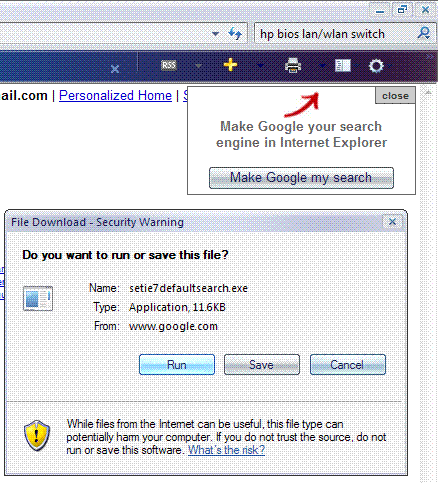
Using IE7 in Vista build 5321, I went to Google. And what does Google offer me but an IE7-specific update to change the default search engine?

Funny. Google's certainly not waiting for Vista to ship.
Funny. Google's certainly not waiting for Vista to ship.
Subscribe to:
Posts (Atom)

 Posts
Posts

