
Saturday, October 08, 2011


Learn to be a better troubleshooter
The very best technical talents often have massive troubleshooting chops. But troubleshooting isn't inherently a technical skill; it's a set of tools to achieve clear thinking and knowledge.
This is science!
For your consideration: the clearest expositions of technical troubleshooting strategies and tactics since Sun Tzu did it for war.
In no particular order, here are links and a few choice excerpts.
ESR, the ninja-slicing, recursive-software-naming, Free Software advocate who is a key figure in the culture of open-source, wrote one of the foundational documents of hackerdom. As of this writing, it's at version 3.7, last updated December 2010. The beauty of it is, in telling you how to ask questions the smart way, it also teaches you troubleshooting.
How To Ask Questions The Smart Way
Eric Steven Raymond
Do the best you can to anticipate the questions a hacker will ask, and answer them in advance in your request for help.
- Be precise and informative about your problem
- Describe the symptoms of your problem or bug carefully and clearly.
- Describe the environment in which it occurs (machine, OS, application, whatever). Provide your vendor's distribution and release level (e.g.: “Fedora Core 7â€, “Slackware 9.1â€, etc.).
- Describe the research you did to try and understand the problem before you asked the question.
- Describe the diagnostic steps you took to try and pin down the problem yourself before you asked the question.
- Describe any possibly relevant recent changes in your computer or software configuration.
- If at all possible, provide a way to reproduce the problem in a controlled environment.
Giving hackers the ability to reproduce the problem in a controlled environment is especially important if you are reporting something you think is a bug in code. When you do this, your odds of getting a useful answer and the speed with which you are likely to get that answer both improve tremendously.
ESR also says:
Simon Tatham has written an excellent essay entitled How to Report Bugs Effectively. I strongly recommend that you read it.
I agree! Check it out:
- The first aim of a bug report is to let the programmer see the failure with their own eyes. If you can't be with them to make it fail in front of them, give them detailed instructions so that they can make it fail for themselves.
- In case the first aim doesn't succeed, and the programmer can't see it failing themselves, the second aim of a bug report is to describe what went wrong. Describe everything in detail. State what you saw, and also state what you expected to see. Write down the error messages, especially if they have numbers in.
- When your computer does something unexpected, freeze. Do nothing until you're calm, and don't do anything that you think might be dangerous.
- By all means try to diagnose the fault yourself if you think you can, but if you do, you should still report the symptoms as well.
- Be ready to provide extra information if the programmer needs it. If they didn't need it, they wouldn't be asking for it. They aren't being deliberately awkward. Have version numbers at your fingertips, because they will probably be needed.
- Write clearly. Say what you mean, and make sure it can't be misinterpreted.
- Above all, be precise. Programmers like precision.
But the first place I send people when I want them to understand what I'd like to get as a good bug report is Joel Spolsky's story of Jane, the very, very good software tester.
It's pretty easy to remember the rule for a good bug report. Every good bug report needs exactly three things.
Seems easy, right? Maybe not. As a programmer, people regularly assign me bugs where they left out one piece or another.
- Steps to reproduce,
- What you expected to see, and
- What you saw instead.
If you don't tell me how to repro the bug, I probably will have no idea what you are talking about. "The program crashed and left a smelly turd-like object on the desk." That's nice, honey. I can't do anything about it unless you tell me what you were doing.
If you don't specify what you expected to see, I may not understand why this is a bug. The splash screen has blood on it. So what? I cut my fingers when I was coding it. What did you expect? Ah, you say that the spec required no blood! Now I understand why you consider this a bug.
Part three. What you saw instead. If you don't tell me this, I don't know what the bug is. That one is kind of obvious.
Check out this book: Are Your Lights On: How to find out what the problem really is, by Gause and Weinberg. They wrote the book on requirements, too.

Here's some random guy's 2 minute video review of it:
KB555375 might be Microsoft's best KB article of all time - but by all means, if you know a better one, say so in the comments.
Microsoft Support Knowledgebase Article ID: 555375 - Last Review: July 22, 2005 - Revision: 1.0
How to ask a question
Author: Daniel Petri MVPIn fact, if you know of ANY other top-notch sources of troubleshooting wisdom, put a link in the comments!
Good examples of questions will include information from most of the following categories: - What are you trying to do?- Why are you trying to do it?- What did you try already, why, and what was the result of your actions?- What was the exact error message that you received?- How long have you been experiencing this problem?- Have you searched the relevant forum/newsgroup archives?- Have you searched for any tools or KB articles or any other resources?- Have you recently installed or uninstalled any software or hardware?- What changes were made to the system between the time everything last worked and when you noticed the problem? Don't let us assume, tell us right at the beginning.
There's one I'm trying to find that I had as a mousepad - it was about 10 troubleshooting tips - one of them was something like "Problems don't just go away on their own. If you haven't fixed the problem, the problem isn't fixed." Anybody know what that's from?
(I'll try to fix the formatting on this post later, ok?)
Friday, September 02, 2011
Client software installation methods as children's toys
Hey, kids - it's time for everyone's favorite IT game: torture the analogy! Ready to play? Yay!
Imagine you get a brand-new employer-issued, Windows computer. It's fresh and pristine, and working great. It's got Office, and a web browser (well, let's be honest - it has Internet Explorer). It can do basic stuff.
But it doesn't have the software you need to do the parts of your job that make it different from every other job that involves sitting in front of a computer.
 You've got to put that software on top of your fresh, pristine computer.
It's like a little kid in a room that's white from the shag carpet to the velour wallpaper.
Think of the different ways you can get your software on this computer as different toys that kid could have in their hand.
Manual install from media or download from vendor : marker

Packaged installers (automated install) : pencil

Terminal Services / Citrix XenApp (née Metaframe) : ViewMaster

App-V / Thinstall (app isolation) : Colorforms

I always did like Colorforms.
Imagine you get a brand-new employer-issued, Windows computer. It's fresh and pristine, and working great. It's got Office, and a web browser (well, let's be honest - it has Internet Explorer). It can do basic stuff.
But it doesn't have the software you need to do the parts of your job that make it different from every other job that involves sitting in front of a computer.
You've got to put that software on top of your fresh, pristine computer.It's like a little kid in a room that's white from the shag carpet to the velour wallpaper.
Think of the different ways you can get your software on this computer as different toys that kid could have in their hand.
Manual install from media or download from vendor : marker
Terminal Services / Citrix XenApp (née Metaframe) : ViewMaster
App-V / Thinstall (app isolation) : Colorforms
I always did like Colorforms.
Friday, August 12, 2011
An incomplete history of source code version control from SCCS to Mercurial
Once upon a time, in the 1970s, there was SCCS. It was big on PDP-11's and the like.
Then came RCS, which could do version control for individual files, but not for entire projects.
Finally, CVS arrived in the 1980s and people said "ok, finally we have something that can be credibly called source code version control."
And people used CVS for a good long while. And it was way better than not having version control.
But there were some problems.
Turns out that giving multiple people the ability to travel through time and alter the history of incredibly complicated documents with complex interdepencies can have a few wrinkles to it. Who woulda thunk it?
So, once we all survived Y2k, SVN was created, to be pretty much just like CVS, but working correctly.
Whole teams could work on projects, and fork, and branch, and all sorts of lovely things, all out of a central repository. A rich ecosystem built on SVN; IDEs integrated SVN functionality; issue tracking systems linked in so that commit messages could update the status of bugs; and vice versa. And not only is it well understood how to operate the software, even the business processes around code management using SVN are well understood and documented - for example, a very pragmatic book about it.
And that went pretty darned well for a good long while. Talk about mature!
So Linus created Git. And lo, Git is mighty. It can handle just about everything you can imagine. It's used by nearly everyone who operates at that scale, and all the open-source hackers who want free hosting at places like Google Code and Github. The best practices are mature.
So, here's the state of play these days:
SCCS and RCS are legacy software, like COBOL - still plays a valuable role, but generally not chosen for any new implementations.
There are old CVS implementations out there, often cursed at by the poor programmers who haven't been able to convince their management to upgrade to SVN. CVS is kind of the Internet Explorer 6 of version control systems these days.
Most enterprises have at least SVN (or some commercial equivalents, like the version control built into Visual Studio) and it's hard to think of an IDE with version control support that doesn't support SVN.
Many modern IDEs have added native support for GIT; tons of tech companies are using it. Including some folks who are pretty hard-core.
(Did you notice I only discussed open source version control systems? Yeah. I said it was incomplete.)
Then came RCS, which could do version control for individual files, but not for entire projects.
Finally, CVS arrived in the 1980s and people said "ok, finally we have something that can be credibly called source code version control."
And people used CVS for a good long while. And it was way better than not having version control.
But there were some problems.
Turns out that giving multiple people the ability to travel through time and alter the history of incredibly complicated documents with complex interdepencies can have a few wrinkles to it. Who woulda thunk it?
So, once we all survived Y2k, SVN was created, to be pretty much just like CVS, but working correctly.
Whole teams could work on projects, and fork, and branch, and all sorts of lovely things, all out of a central repository. A rich ecosystem built on SVN; IDEs integrated SVN functionality; issue tracking systems linked in so that commit messages could update the status of bugs; and vice versa. And not only is it well understood how to operate the software, even the business processes around code management using SVN are well understood and documented - for example, a very pragmatic book about it.
And that went pretty darned well for a good long while. Talk about mature!
But then Linus came along and started an open source project with thousands of contributors all around the world. Mind-bogglingly large scaling issues here. In fact, it had to be distributed - there couldn't be a single central store. And this just exceeded SVN's capabilities.
So Linus created Git. And lo, Git is mighty. It can handle just about everything you can imagine. It's used by nearly everyone who operates at that scale, and all the open-source hackers who want free hosting at places like Google Code and Github. The best practices are mature.
So, here's the state of play these days:
SCCS and RCS are legacy software, like COBOL - still plays a valuable role, but generally not chosen for any new implementations.
There are old CVS implementations out there, often cursed at by the poor programmers who haven't been able to convince their management to upgrade to SVN. CVS is kind of the Internet Explorer 6 of version control systems these days.
Most enterprises have at least SVN (or some commercial equivalents, like the version control built into Visual Studio) and it's hard to think of an IDE with version control support that doesn't support SVN.
Many modern IDEs have added native support for GIT; tons of tech companies are using it. Including some folks who are pretty hard-core.
And there's an incredibly elegant system called Mercurial (Hg). Many people like to compare and contrast Git and Mercurial.
So, here we are, with Subversion, Git and Mercurial as obvious choices to select from, whether you're an open source project looking for free hosting on Google Code, a one person iPhone developer, or a Fortune 500 company.
So, here we are, with Subversion, Git and Mercurial as obvious choices to select from, whether you're an open source project looking for free hosting on Google Code, a one person iPhone developer, or a Fortune 500 company.
If you care, here are links to my delicious tags for:
(Did you notice I only discussed open source version control systems? Yeah. I said it was incomplete.)
Architecture & The Book of Five Rings
Miyamoto Musashi's The Book of Five Rings is a classic text of the martial arts, written in 17th century Japan. I'm reading Thomas Cleary's excellent translation.
Cleary argues that Musashi intended his work to apply not just to fighting, but to every endeavor of life. I'm certainly seeing the applicability to IT architecture:
Cleary argues that Musashi intended his work to apply not just to fighting, but to every endeavor of life. I'm certainly seeing the applicability to IT architecture:
The carpenter is used as a metaphor in reference to the notion of a house. We speak of aristocratic houses, military houses, houses of the arts; we speak of a house collapsing or a house continuing; and we speak of such and such a tradition, style, or "house." Since we use the expression "house," therefore, I have employed the way of the master carpenter as a metaphor.
The world of carpenter is written with characters meaning "great skill" or "master plan." Since the science of martial arts involves great skill and master planning, I am writing about it in terms of comparison with carpentry.
If you want to learn the science of martial arts, meditate on this book; let the teacher be the needle, let the student be the thread, and practice unremittingly.
Likening the Science of Martial Arts to Carpentry
As the master carpenter is the overall organizer and director of the carpenters, it is the duty of the master carpenter to understand the regulations of the country, find out the iregulations of the locality, and attend ot the regulations of the master carpenter's own establishment.
The master capenter, knowing the measurements and designs of all sorts of structures, employs people to build houses. In this respect, the master carpenter is the same as the master warrior.
When sorting out timber for building a house, that which is straight, free from knots, and of good appearance can be used for front pillars. That which has some knots but is straight and strong ca be used for rear pillars. That which is somewhat weak yet has no knots and looks good is variously used for door sills, lintels, doors, and screens. That which is knotted and crookend but nevertheless strong is used thoughtfully in consiration of the strneght of the various members of the house. Then the house will last a long time.
Even knotted, crooked, and weak timber can be made into scaffolding, and later used for firewood.
As the master carpenter directs the journeymen, he knows their various levels of skill and gives them appropriate tasks. Some are assigned to the flooring, some to the doors and screens, some to the sills, lintels and ceilings, and so on. He has the unskilled set out floor joists, and gets those even less skilled to carve wedges. When the master carpenter exercises discernment in the assignment of jobs, the work progresses smoothly.
Efficiency and smooth progress, prudence in all matters, recognizing true courage, recognizing different levels of morale, instilling confidence, and realizing what can and cannot be reasonably expected — such are the matters on the mind of the master carpenter. The principle of martial arts is like this.You can include IT under that metaphor just as easily as martial arts.
The Science of Martial Arts
Speaking in terms of carpentry, soldiers sharpen their own tools, make various useful implements, and keep them in their utility boxes. Receiving instructions from a master carpenter, they hew pillars and beams with adzes, shave flors and shelving with planes, even carve openwork and bas relief. Making sure themeasurements are correct, they see to all the necessary tasks in an efficient manner; this is the rule for carpentry. When one has develop practical knowledge of all the skills of the craft, eventually one can become a master carpenter oneself.
An essential habit for carpenters is to have sharp tools and keep them whetted. Is is up to the carpenter to use these tools masterfully, even making such things as miniature shrines, bookshelves, tables, lamp stands, cutting boards, and pot covers. Being a soldier is like this. This should be given careful reflection.
Necessary accomplishments of a carpenter are avoiding crookedness, getting joints to fit together, skillful planing, avoiding abrasion, and seeing that there is no subsequent warping.
If you want to learn this science, then take everything I write to heart and think it over carefully.
Friday, February 25, 2011
Consumerization of Enterprise IT Goes Both Ways
Lots of talk recently about the consumerization of IT and the end of the IT department.
I am wrapping up two launches of consumerized IT services in the enterprise right now, and have been talking about this professionally for years. Here's what I have to tell you about it:
It goes both ways.
If you want to consumerize enterprise IT, your enterprise has to act like a retail consumer.
The product works the way it works, and that’s that. You can complain about it on Twitter, but you’re not going to have it change features and functionality to suit your every whim - or even to meet mandatory business requirements.
It is what it is. If you can live with that, you can have it!
The problem comes when enterprises can’t live with that. They DO have mandatory requirements, and the consumer stuff (and many enterprise COTS packages) just doesn’t meet them out of the box.
If such enterprises want to consumerize their IT services, then they are going to have to either accept not meeting their requirements for every system, or change their policies to match what is achievable off-the-shelf.
In the meantime, their employees are hacking work.
I am wrapping up two launches of consumerized IT services in the enterprise right now, and have been talking about this professionally for years. Here's what I have to tell you about it:
It goes both ways.
If you want to consumerize enterprise IT, your enterprise has to act like a retail consumer.
The product works the way it works, and that’s that. You can complain about it on Twitter, but you’re not going to have it change features and functionality to suit your every whim - or even to meet mandatory business requirements.
It is what it is. If you can live with that, you can have it!
The problem comes when enterprises can’t live with that. They DO have mandatory requirements, and the consumer stuff (and many enterprise COTS packages) just doesn’t meet them out of the box.
If such enterprises want to consumerize their IT services, then they are going to have to either accept not meeting their requirements for every system, or change their policies to match what is achievable off-the-shelf.
In the meantime, their employees are hacking work.
Monday, November 08, 2010
How to easily load and read .CBR files from your computer onto your iPad
Install Stanza and Dropbox on your iPad. Set up a free Dropbox account.
Upload the .CBR to your Dropbox folder from your computer.
Open it in Dropbox app on your iPad. Dropbox will say it can't display the file, never fear.
Do "Open in Stanza." (This takes a minute or two. It's still quicker than other methods.)
Done.
Yes, there are other ways to do it (copy through iTunes, use Stanza's server, etc) but this is quick and easy, even for non-geeks.
Upload the .CBR to your Dropbox folder from your computer.
Open it in Dropbox app on your iPad. Dropbox will say it can't display the file, never fear.
Do "Open in Stanza." (This takes a minute or two. It's still quicker than other methods.)
Done.
Yes, there are other ways to do it (copy through iTunes, use Stanza's server, etc) but this is quick and easy, even for non-geeks.
Wednesday, September 09, 2009
Me, side-by-side with Douglas Adams
What happens if you search the iTunes store for Towel?
You find Douglas Adams, and you find me!
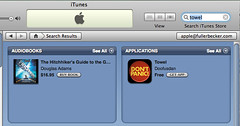
You find Douglas Adams, and you find me!
Monday, August 03, 2009
Use Outlook 2007 to make collaborating between organizations easier – share your free/busy times
Folks who use Outlook and Exchange together are used to being able to use Outlook's free/busy times to tell when other people in their organization are available to meet. But what happens when a vendor or business partner from outside your organization is trying to find a time to meet with you?
Typically for me, it used to be: find a bunch of available times; write them down and email them to the vendor; then the vendor checks on their end with the folks they need to bring and picks one, but by then, I've been scheduled for three more meetings and that free time isn't free any longer – so like they say on the shampoo bottle, "lather, rinse, repeat." What a waste of time!
With Outlook 2007* there's a better way!
Dear vendor, you can see my calendar at this link: https://calendars.office.microsoft.com/en-us/pubcal/viewer.aspx?path=%2fpubcalstorage%2fdnlhhqlz1065262%2fBecker_Dan_Calendar.ics Please schedule the meeting for a time I'm available.
[Go ahead and click that link – you'll see my actual availability!]
How did I do that?
Outlook 2007 makes it very easy to share your calendar online with people outside your company, using Outlook 2007.
Interested? Well good! Microsoft has written up just what you need to do to make it happen: Publish a calendar on Office Online
I strongly suggest you use the option to publish Availability only to minimize the risk of information disclosure.
You can also choose whether to share your calendar information only with specific people, or just publish it for the whole Internet to see. (I'm sure you can guess which is the more secure approach – but you will have to make the calculation about convenience vs. security of your schedule. Since I've blogged, twittered, etc. for quite a while, I'm obviously somewhat comfortable with the Internet knowing quite a bit about me. Your tolerance for that may differ.)
If you want to restrict access to your calendar to only invited people, you need to sign up for a Windows Live ID account.
I hope this tip will make collaborating across organizational boundaries a bit easier for you.
*Yes, you used to be able to do this with earlier versions of Outlook back when Microsoft ran a public free/busy server – but that was shut down years ago. But this one works 'out of the box' with Outlook just by following the instructions, no need to install any extra software.** Easy-peasy!
**And yes, there are a gazillion other ways to do this, and using Outlook and Exchange is SOOOOO 20th century, get with the web2.0 wave, blah blah blah. Ok, if you know that already, then this blog post is not for you! It's for folks who still need to use Outlook & Exchange but also need to collaborate outside their organizational boundaries.
Thursday, July 02, 2009
Now Firefox 3.5 compatible: Seattle Public Library LibX Edition
LibX is an open-source project that creates browser extensions that give you one-click access to the online card catalog from your own library. See a book you're interested in on Amazon, or anywhere on the Internet for that matter? LibX makes checking to see whether it's available via your library - and if so, reserving it - as easy as pie!
But a LibX "edition" needs to be set up for each library. And the great folks behind LibX have made it easy to do that! So a while back, I made a Seattle Public Library LibX edition.
And now it's updated for Firefox 3.5 compatibility.
If you have already installed the Seattle Public Library edition of LibX, the next time you launch Firefox, it should automatically prompt you that an update is available to install.
Otherwise, go ahead and install Seattle Public Library LibX now! (There is a version for Internet Explorer, too. Sorry, there's no LibX for Chrome or Safari.)
And if you are reading this but don't get your books from SPL, check to see if there is a LibX edition for your library. If there isn't, you should make one with LibX Edition Builder! It's a great way for geeks to support their local library.
But a LibX "edition" needs to be set up for each library. And the great folks behind LibX have made it easy to do that! So a while back, I made a Seattle Public Library LibX edition.
And now it's updated for Firefox 3.5 compatibility.
If you have already installed the Seattle Public Library edition of LibX, the next time you launch Firefox, it should automatically prompt you that an update is available to install.
Otherwise, go ahead and install Seattle Public Library LibX now! (There is a version for Internet Explorer, too. Sorry, there's no LibX for Chrome or Safari.)
And if you are reading this but don't get your books from SPL, check to see if there is a LibX edition for your library. If there isn't, you should make one with LibX Edition Builder! It's a great way for geeks to support their local library.
Subscribe to:
Posts (Atom)

 Posts
Posts

